
Microsoft Dynamics GP Sales Tax – More Detail

I was sent an email recently from someone who ready my January Post (link below) regarding Microsoft Dynamics GP Sales Tax Calculations.  The email requested more information on the following section of the blog:

I was sent an email recently from someone who ready my January Post (link below) regarding Microsoft Dynamics GP Sales Tax Calculations.  The email requested more information on the following section of the blog:

Originally Posted 5/29/13

I was sent an email recently from someone who ready my January Post (link below) regarding Microsoft Dynamics GP Sales Tax Calculations.  The email requested more information on the following section of the blog:

If the item is going to be delivered to the customer, AND the tax was setup with the item, we charge based on the tax details that are common in both the Item tax schedule AND the customer’s tax schedule.

Continue reading “Microsoft Dynamics GP Sales Tax – More Detail”

Bill of Materials Introduction – Microsoft Dynamics GP (with video)

Here I’ll provide a brief demonstration on the functionality of the Bill of Materials module in Microsoft Dynamics GP Inventory Control.

Here I’ll provide a brief demonstration on the functionality of the Bill of Materials module in Microsoft Dynamics GP Inventory Control.

Here I’ll provide a brief demonstration on the functionality of the Bill of Materials module in Microsoft Dynamics GP Inventory Control. 

Continue reading “Bill of Materials Introduction – Microsoft Dynamics GP (with video)”

When did it post in Microsoft Dynamics GP (with video)

I noticed today the following message from a Microsoft Dynamics GP user on GPUG Collaborate:

Does anyone know how to run a trial balance or JE listing out of GP or a Smartlist that shows the date that the entry was originally recorded?  For instance, all December 2012 entries that were recorded and posted after January 15, 2013. 

I noticed today the following message from a Microsoft Dynamics GP user on GPUG Collaborate: Does anyone know how to run a trial balance or JE listing out of GP or a Smartlist that shows the date that the entry was originally recorded?  For instance, all December 2012 entries that were recorded and posted after January 15, 2013. 

I noticed today the following message from a Microsoft Dynamics GP user on GPUG Collaborate:

Does anyone know how to run a trial balance or JE listing out of GP or a Smartlist that shows the date that the entry was originally recorded?  For instance, all December 2012 entries that were recorded and posted after January 15, 2013. 

Microsoft Partner Rod O’Connor from Briware Solutions gave a great answer regarding how to have this show in SmartList.

Continue reading “When did it post in Microsoft Dynamics GP (with video)”

Selling Kits in Microsoft Dynamics GP (with video)

An item type assigned to items that consist of other component items that are assembled at the time of sale. The kit is a single item with an item number; it consists of one or more component items in your Microsoft Dynamics GP inventory. Component items can be services, sales inventory, discontinued, miscellaneous charge, and flat fee items.

What is a Kit?  (THIS IS DIRECT FROM GP HELP)

An item type assigned to items that consist of other component items that are assembled at the time of sale. The kit is a single item with an item number; it consists of one or more component items in your Microsoft Dynamics GP inventory. Component items can be services, sales inventory, discontinued, miscellaneous charge, and flat fee items.

 I do not know what McDonald’s uses for an Accounting/ERP system, but if you use Microsoft Dynamics GP Sales order Processing, I’m sure you can think of a lot of opportunities by using Kits.

Continue reading “Selling Kits in Microsoft Dynamics GP (with video)”

Microsoft Dynamic GP Outstanding Transactions in Bank Reconciliation

The Outstanding Transactions Report in Microsoft Dynamics GP Bank Reconciliation is a report worthy of attention.  Although almost every posting report in GP can be reprinted at a later point in time, this information cannot.

The Outstanding Transactions Report in Microsoft Dynamics GP Bank Reconciliation is a report worthy of attention.  Although almost every posting report in GP can be reprinted at a later point in time, this information cannot.

Originally Posted 05/05/2013

The Outstanding Transactions Report in Microsoft Dynamics GP Bank Reconciliation is a report worthy of attention.  Although almost every posting report in GP can be reprinted at a later point in time, this information cannot.

Continue reading “Microsoft Dynamic GP Outstanding Transactions in Bank Reconciliation”

Microsoft Dynamics GP – SOP work by Document or Batch?

I have a Distribution Client who uses Sales Order Processing (or SOP) in Microsoft Dynamics GP.  As this client fills orders, they handle each order one at a time.  In this video I demonstrate how I suggest using batches to save time in the following areas:

I have a Distribution Client who uses Sales Order Processing (or SOP) in Microsoft Dynamics GP.  As this client fills orders, they handle each order one at a time.  In this video I demonstrate how I suggest using batches to save time in the following areas:

eggwithbarcode-resized-600

  • Transfer from Backorder to Order
  • Printing Orders and Packing Slips
  • Transferring to Invoices
  • Printing or emailing Invoices
  • Posting Invoices

If you use Deposits, or any of the fields at the bottom of the invoice, you’ll need to make sure you do this.  A Good practice is to always select to include Totals and Deposits!


Continue reading “Microsoft Dynamics GP – SOP work by Document or Batch?”

Microsoft Dynamics GP Multiple Doc SOP Transfer?

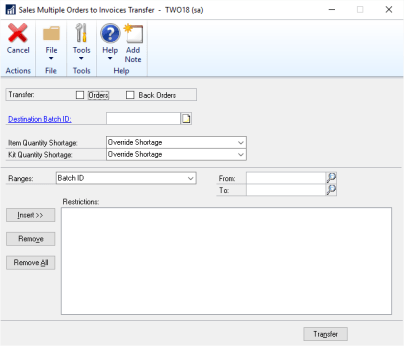
There is an alternative to transferring Microsoft Dynamics GP SOP documents by individual document or batches, called “Sales Multiple Orders to Invoice Transfer.” 

There is an alternative to transferring Microsoft Dynamics GP SOP documents by individual document or batches, called “Sales Multiple Orders to Invoice Transfer.” 

I have a Distribution Client who uses Sales Order Processing (or SOP) in Microsoft Dynamics GP.  As this client fills orders, they handle each order one at a time.  In a previous blog posting, I demonstrate how I suggest using batches to save time in the following areas:

  • Transfer from Backorder to Order
  • Printing Orders and Packing Slips
  • Transferring to Invoices
  • Printing or emailing Invoices
  • Posting Invoices

There is an alternative to transferring SOP documents by individual document or batches, called “Sales Multiple Orders to Invoice Transfer.” 

This window is available only if you’re using sales fulfillment workflow.  Note the screenshot is from GP2018.

Continue reading “Microsoft Dynamics GP Multiple Doc SOP Transfer?”

Microsoft Dynamics GP Quote Expiration Date (with video)

OK, so you use Microsoft Dynamics GP Sales Order Processing (SOP) and you send Quotes to customers and prospects using this module.  Did you know you can use Expiration Dates on Quotes?  Do you know how to work around Expiration Dates on Quotes?  Do you know how to manage Expired Quotes?

Microsoft Dynamics Quote Expiration Date (with video)

OK, so you use Microsoft Dynamics GP Sales Order Processing (SOP) and you send Quotes to customers and prospects using this module.  Did you know you can use Expiration Dates on Quotes?  Do you know how to work around Expiration Dates on Quotes?  Do you know how to manage Expired Quotes?

I do recommend using expiration dates for Quotes as a form of protection against changing prices.  Expiration dates do print on Quotes by default so there is very little extra work involved in setting them up.

Where do you setup the default number of days until expiration?

Let’s start by setting up a default number of days for a quote to expire.  This is handled by going into the Sales Order Processing Setup window.

Continue reading “Microsoft Dynamics GP Quote Expiration Date (with video)”

Microsoft Dynamics GP User Group (GPUG) Tech Tips Exert

Below is an exert from a future “Tech Tips” that I wrote for the Microsoft Dynamics GP User Group (GPUG) to send to it’s members.  If you are not a member, you should review membership. 

Originally Posed 1/23/13

Below is an exert from a future “Tech Tips” that I wrote for the Microsoft Dynamics GP User Group (GPUG) to send to it’s members.  If you are not a member, you should review membership.


Continue reading “Microsoft Dynamics GP User Group (GPUG) Tech Tips Exert”

Microsoft Dynamics GP Sales Tax Setup Overview (video)

This is a high level overview of how Sales Tax is setup and works in Microsoft Dynamics GP.

This is a high level overview of how Sales Tax is setup and works in Microsoft Dynamics GP.

Originally Posted 1/13/13

This is a high level overview of how Sales Tax is setup and works in Microsoft Dynamics GP.

Sales Taxes calculations are made based on:

  1. The item being sold,  is it setup as Taxable, non-taxable or is tax determined based on whether or not the customer it taxable?
  2. Is the Customer Taxable or non-taxable?
  3. How is the item being received, by delivery or is the customer picking the item up?

Continue reading “Microsoft Dynamics GP Sales Tax Setup Overview (video)”