Add Microsoft Dynamics GP SmartList to your toolbar, it’s easy!
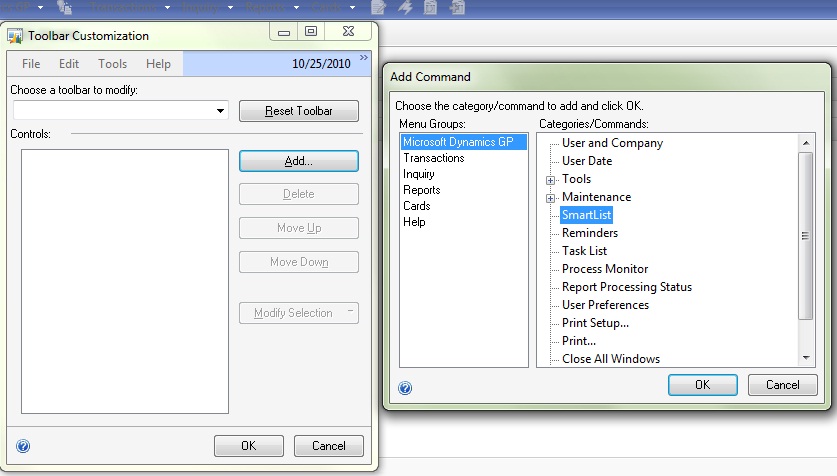
Right mouse click on your GP toolbar, choose the Add button on the Right. Then click through the menu bar as you would to open SmartList.
Once SmartList is highlighted, click OK!

Belinda Allen, Microsoft MVP Business Solutions
Things I've learned from years of working with Microsoft Dynamics GP.
Add Microsoft Dynamics GP SmartList to your toolbar, it’s easy!
I frequently get asked “Why is there a separate step to age Microsoft Dynamics GP Accounts Receivable?”
Posted 4/1/2012
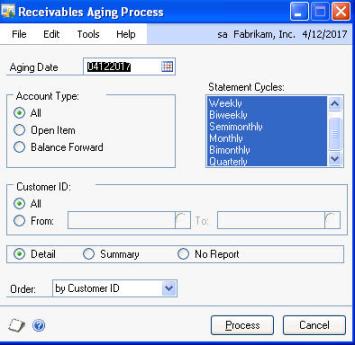
I frequently get asked “Why is there a separate step to age Microsoft Dynamics GP Accounts Receivable?”
Believe it or not, it’s actually a benefit to you.
I have a client who charges their customer a finance charge for all invoices 30 days or older; however experience tells them that many times they charge finance charges, only to receive the payment within a day or two causing them the extra work of writing off the finance charge.
We worked together and created a very smart plan. We change the aging periods from 1-30 to 1-45, then age and charge finance charges for invoices over 45 days old. We then change the aging period back to 1-30 and age again. This method, only ended up charging finance charges for invoices over 45 (even though their customer is expecting over 30)days old.
There are many reasons you may want or need control over aging, and with GP you have it!
One of the most frustration situations I come across is when I walk into an existing user of Microsoft Dynamics GP only to find they are using Payables Management (PM) as a fancy check writer rather than a tool to manage payables.
Originally Posted 3/29/2012
One of the most frustration situations I come across is when I walk into an existing user of Microsoft Dynamics GP only to find they are using Payables Management (PM) as a fancy check writer rather than a tool to manage payables.
I often wish I had a portable soap box to stand on when I say “enter all of your every day and you’ll reap all kinds of benefits!”
If you enter ALL invoices in PM every day, you can take advantage of tools. You can answer all of the following questions:
1) How much do we have outstanding right now?
2) What’s due through next week?
3) How much is past due?
and more…
This is what PM is all about. Bank Reconciliation can print a check, payables is designed to help you track invoices by vendor, update the GL of transactions from invoices and their payments, determine when an invoice is due and when it’s best to pay… Basically its a way to MANAGE your payables, hence the name Payables Management.
Did you know there is a report called Cash Requirements where you can enter a date and the system will show you all invoices due by that date with a total dollar amount?
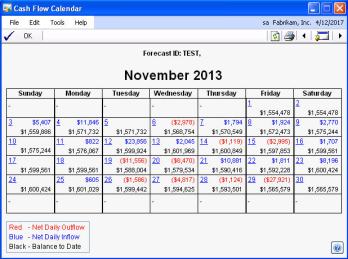
Did you know the Cash Flow Module will look at PM and determine how much cash is due to flow out of the company by that due date?
Don’t do extra work, let PM help you!
This video shows how I suggest data be imported if you use an outside payroll service like ADP, Paychex, etc. I show an Import I setup Integration Manager and Microsoft Dynamics GP.
Originally Posted 3/21/12
This video shows how I suggest data be imported if you use an outside payroll service like ADP, Paychex, etc. I show an Import I setup Integration Manager and Microsoft Dynamics GP.
Continue reading “Import of Payroll to Microsoft Dynamics GP from Outside Payroll Service”
Using Microsoft Dynamics GP, if you do Bi-weekly payrolls, you pay employees 26 times a year. If you have monthly deductions, like health insurance, you have a monthly amount for each employee to deduct.
Posted 2012
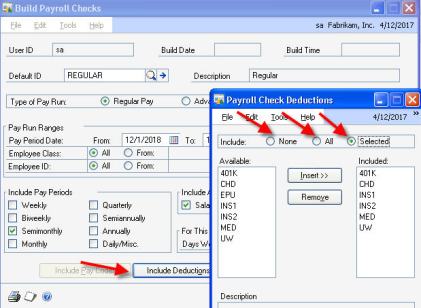
Using Microsoft Dynamics GP, if you do Bi-weekly payrolls, you pay employees 26 times a year. If you have monthly deductions, like health insurance, you have a monthly amount for each employee to deduct.
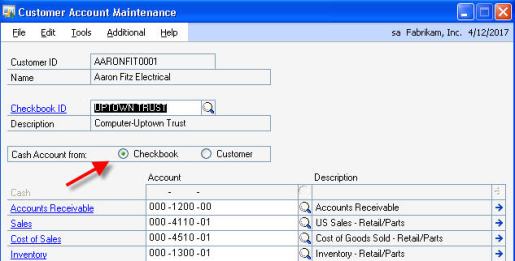
Last week I was working at a client’s office helping entering receivables payments in Microsoft Dynamics GP. While entering I noticed that more often than not the cash account did not default. I realized that the customer card file had been set to pull the cash account from the customer instead of the checkbook.
Posted 2012
ALWAYS USE THE GL ACCOUNTS FROM THEIR MASTER RECORDS TO HELP KEEP SUB-MODULES BALANCED TO THE GENERAL LEDGER!
(Belinda-ism)
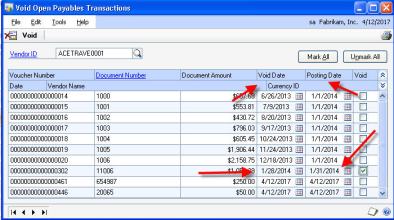
When you void a Microsoft Dynamics GP Payables check or transaction and you just click the box then the void button you’ll be voiding in the GL and in Payables the same date the transaction was originally posted. This may or may not work for you.
Posted in 2012
Continue reading “What the Date (in Microsoft Dynamics GP)????”
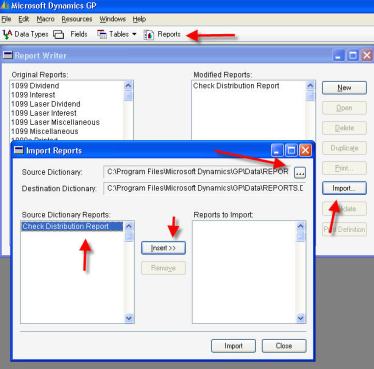
The Microsoft Dynamics GP Reports.dic is the file that holds all modifications and new reports that print directly from GP. More often than not, this file is stored on a shared drive so everyone accesses the same file. This saves a lot of commotion if a change to a report is made.
Posted in 2012
What is this file?
The Microsoft Dynamics GP Reports.dic is the file that holds all modifications and new reports that print directly from GP. More often than not, this file is stored on a shared drive so everyone accesses the same file. This saves a lot of commotion if a change to a report is made.
Continue reading “What’s up *.dic, Microsoft Dynamics GP Reports.dic that is”
Today I want to talk about identifying journal entries in Microsoft Dynamics GP that come from a particular source. An example of this would be entries that come from your CPA.
Originally Posted 9/6/2012
Today I want to talk about identifying journal entries in Microsoft Dynamics GP that come from a particular source. An example of this would be entries that come from your CPA. Whether the entries are received after a month end financial statement review, end-of-the-year review or after an annual audit you may want to track that these entries come from your CPA rather than your internal team.

The easiest way to accomplish this in Microsoft Dynamics GP is to create a new source document. Every journal entry in the general ledger is assigned a source document to identify where this entry originated. For example, if this entry came from payables management module and was an invoice the source document would PMTRX. So let’s create a source document called CPA to identify all transactions that we receive from our CPA.
Continue reading “Using Microsoft Dynamics GP Source Documents to identify GL entries”
November/December is the perfect time to start preparing for those pesky, yet required 1099’s in Microsoft Dynamics GP.
Continue reading “Microsoft Dynamics GP Prepare for your 1099’s”
 Belinda Allen, Microsoft MVP Business Solutions