For those who want to remove the Social Security Number from the (US) Payroll Check Register in Microsoft Dynamics GP, this video is for you.

Belinda Allen, Microsoft MVP Business Solutions
Things I've learned from years of working with Microsoft Dynamics GP.
For those who want to remove the Social Security Number from the (US) Payroll Check Register in Microsoft Dynamics GP, this video is for you.
For those who want to remove the Social Security Number from the (US) Payroll Check Register in Microsoft Dynamics GP, this video is for you.
I noticed today the following message from a Microsoft Dynamics GP user on GPUG Collaborate:
Does anyone know how to run a trial balance or JE listing out of GP or a Smartlist that shows the date that the entry was originally recorded? For instance, all December 2012 entries that were recorded and posted after January 15, 2013.
I noticed today the following message from a Microsoft Dynamics GP user on GPUG Collaborate:
Does anyone know how to run a trial balance or JE listing out of GP or a Smartlist that shows the date that the entry was originally recorded? For instance, all December 2012 entries that were recorded and posted after January 15, 2013.
Microsoft Partner Rod O’Connor from Briware Solutions gave a great answer regarding how to have this show in SmartList.
Continue reading “When did it post in Microsoft Dynamics GP (with video)”
The Outstanding Transactions Report in Microsoft Dynamics GP Bank Reconciliation is a report worthy of attention. Although almost every posting report in GP can be reprinted at a later point in time, this information cannot.

Originally Posted 05/05/2013
The Outstanding Transactions Report in Microsoft Dynamics GP Bank Reconciliation is a report worthy of attention. Although almost every posting report in GP can be reprinted at a later point in time, this information cannot.
Continue reading “Microsoft Dynamic GP Outstanding Transactions in Bank Reconciliation”
Below is an exert from a future “Tech Tips” that I wrote for the Microsoft Dynamics GP User Group (GPUG) to send to it’s members. If you are not a member, you should review membership.
Originally Posed 1/23/13
Below is an exert from a future “Tech Tips” that I wrote for the Microsoft Dynamics GP User Group (GPUG) to send to it’s members. If you are not a member, you should review membership.

Continue reading “Microsoft Dynamics GP User Group (GPUG) Tech Tips Exert”
This is a high level overview of how Sales Tax is setup and works in Microsoft Dynamics GP.
Originally Posted 1/13/13
This is a high level overview of how Sales Tax is setup and works in Microsoft Dynamics GP.
Sales Taxes calculations are made based on:
Continue reading “Microsoft Dynamics GP Sales Tax Setup Overview (video)”
You can combine the supporting documentation in Microsoft Dynamics GP to print with just a few keystrokes. Did you know that?
Originally Posted August 2, 2012
You can combine the supporting documentation in Microsoft Dynamics GP to print with just a few keystrokes. Did you know that?
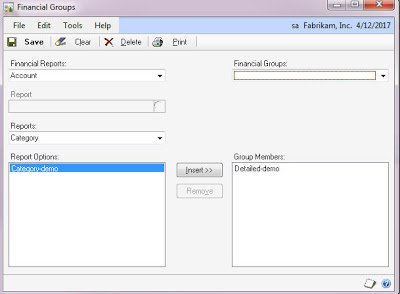
Within each series, under Reports is an option for “Groups.” You can use this window to “group” together all the reports within this series that you want to print.
Keep in mind that you do not get the ability to change the option with this feature, so you must put in criteria that can remain static. For example, do not enter a date range of 01/01/11 – 01/31/11, instead use “Beginning Last Month” to “End of Last Month.”
Also keep in mind that you need to set the destination each option to the printer so they’ll print automatically rather than ask you each time.
Once you create a group for each series, you can use “Combine Groups” under Reports to combine the groups.
If you use Microsoft Dynamics GP and have ever wanted to easier way to monitor open purchase orders and line items that have been received and not invoiced, you’re in luck.

Originally Posted 5/7/2012
If you use Microsoft Dynamics GP and have ever wanted to easier way to monitor open purchase orders and line items that have been received and not invoiced, you’re in luck.
I will show you how to use Excel Refreshable Reports to monitor both Open and Historical Invoices. It’s easier than you might think!
Continue reading “Microsoft Dynamics GP – Manage Purchase Orders with Excel”
One of the most frustration situations I come across is when I walk into an existing user of Microsoft Dynamics GP only to find they are using Payables Management (PM) as a fancy check writer rather than a tool to manage payables.
Originally Posted 3/29/2012
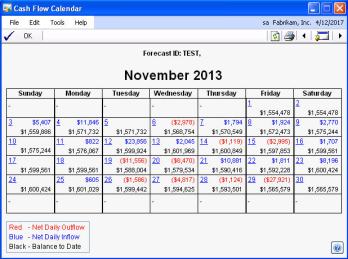
One of the most frustration situations I come across is when I walk into an existing user of Microsoft Dynamics GP only to find they are using Payables Management (PM) as a fancy check writer rather than a tool to manage payables.
I often wish I had a portable soap box to stand on when I say “enter all of your every day and you’ll reap all kinds of benefits!”
If you enter ALL invoices in PM every day, you can take advantage of tools. You can answer all of the following questions:
1) How much do we have outstanding right now?
2) What’s due through next week?
3) How much is past due?
and more…
This is what PM is all about. Bank Reconciliation can print a check, payables is designed to help you track invoices by vendor, update the GL of transactions from invoices and their payments, determine when an invoice is due and when it’s best to pay… Basically its a way to MANAGE your payables, hence the name Payables Management.
Did you know there is a report called Cash Requirements where you can enter a date and the system will show you all invoices due by that date with a total dollar amount?
Did you know the Cash Flow Module will look at PM and determine how much cash is due to flow out of the company by that due date?
Don’t do extra work, let PM help you!
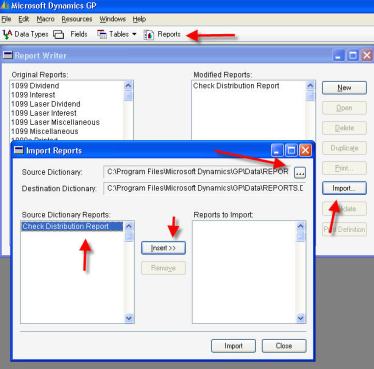
The Microsoft Dynamics GP Reports.dic is the file that holds all modifications and new reports that print directly from GP. More often than not, this file is stored on a shared drive so everyone accesses the same file. This saves a lot of commotion if a change to a report is made.
Posted in 2012
What is this file?
The Microsoft Dynamics GP Reports.dic is the file that holds all modifications and new reports that print directly from GP. More often than not, this file is stored on a shared drive so everyone accesses the same file. This saves a lot of commotion if a change to a report is made.
Continue reading “What’s up *.dic, Microsoft Dynamics GP Reports.dic that is”
Today I want to talk about identifying journal entries in Microsoft Dynamics GP that come from a particular source. An example of this would be entries that come from your CPA.
Originally Posted 9/6/2012
Today I want to talk about identifying journal entries in Microsoft Dynamics GP that come from a particular source. An example of this would be entries that come from your CPA. Whether the entries are received after a month end financial statement review, end-of-the-year review or after an annual audit you may want to track that these entries come from your CPA rather than your internal team.

The easiest way to accomplish this in Microsoft Dynamics GP is to create a new source document. Every journal entry in the general ledger is assigned a source document to identify where this entry originated. For example, if this entry came from payables management module and was an invoice the source document would PMTRX. So let’s create a source document called CPA to identify all transactions that we receive from our CPA.
Continue reading “Using Microsoft Dynamics GP Source Documents to identify GL entries”
 Belinda Allen, Microsoft MVP Business Solutions