Continue reading “User Defined Fields in Microsoft Dynamics GP Smartlist?”

Belinda Allen, Microsoft MVP Business Solutions
Things I've learned from years of working with Microsoft Dynamics GP.
I wanted to share with you another use for Microsoft Dynamics GP User Defined fields.
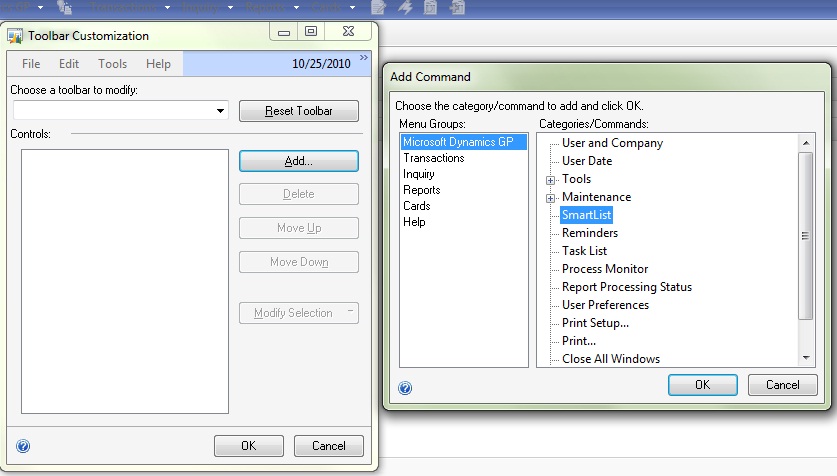
Add Microsoft Dynamics GP SmartList to your toolbar, it’s easy!
I frequently get asked “Why is there a separate step to age Microsoft Dynamics GP Accounts Receivable?”
Posted 4/1/2012
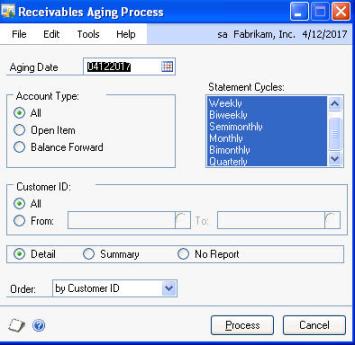
I frequently get asked “Why is there a separate step to age Microsoft Dynamics GP Accounts Receivable?”
Believe it or not, it’s actually a benefit to you.
I have a client who charges their customer a finance charge for all invoices 30 days or older; however experience tells them that many times they charge finance charges, only to receive the payment within a day or two causing them the extra work of writing off the finance charge.
We worked together and created a very smart plan. We change the aging periods from 1-30 to 1-45, then age and charge finance charges for invoices over 45 days old. We then change the aging period back to 1-30 and age again. This method, only ended up charging finance charges for invoices over 45 (even though their customer is expecting over 30)days old.
There are many reasons you may want or need control over aging, and with GP you have it!
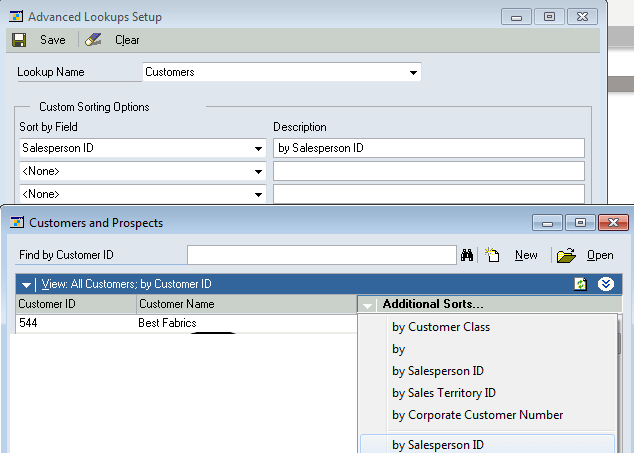
I have the need to look up invoices in Microsoft Dynamics GP Sales Order Processing by the Ship to Address. Until I setup Advanced Lookups to help me, I didn’t realize how much time and effort I used finding the right invoice. I then expanded my use of Advanced Lookups to include GL Accounts. Wow, taking advantage of a small featured yielded me great benefits!
Originally Posted 3/29/12
I have the need to look up invoices in Microsoft Dynamics GP Sales Order Processing by the Ship to Address. Until I setup Advanced Lookups to help me, I didn’t realize how much time and effort I used finding the right invoice. I then expanded my use of Advanced Lookups to include GL Accounts. Wow, taking advantage of a small featured yielded me great benefits!
Continue reading “Save Time and Effort with Microsoft Dynamics GP Advanced Lookups”
One of the most frustration situations I come across is when I walk into an existing user of Microsoft Dynamics GP only to find they are using Payables Management (PM) as a fancy check writer rather than a tool to manage payables.
Originally Posted 3/29/2012
One of the most frustration situations I come across is when I walk into an existing user of Microsoft Dynamics GP only to find they are using Payables Management (PM) as a fancy check writer rather than a tool to manage payables.
I often wish I had a portable soap box to stand on when I say “enter all of your every day and you’ll reap all kinds of benefits!”
If you enter ALL invoices in PM every day, you can take advantage of tools. You can answer all of the following questions:
1) How much do we have outstanding right now?
2) What’s due through next week?
3) How much is past due?
and more…
This is what PM is all about. Bank Reconciliation can print a check, payables is designed to help you track invoices by vendor, update the GL of transactions from invoices and their payments, determine when an invoice is due and when it’s best to pay… Basically its a way to MANAGE your payables, hence the name Payables Management.
Did you know there is a report called Cash Requirements where you can enter a date and the system will show you all invoices due by that date with a total dollar amount?
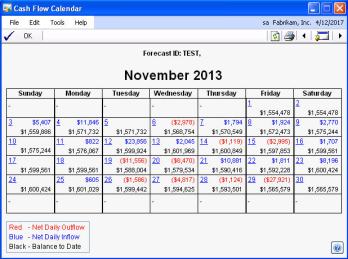
Did you know the Cash Flow Module will look at PM and determine how much cash is due to flow out of the company by that due date?
Don’t do extra work, let PM help you!
As a user, my business partner was always asking “Where does our cash go?” With the use of Smartlist, I was able to efficiently answer that question. To give him a year or month’s worth of data was basically the same as saying “I don’t know.” It’s too much information to process easily. So what did I do?

Originally Posted 3/29/12
As a user, my business partner was always asking “Where does our cash go?” With the use of Smartlist, I was able to efficiently answer that question. To give him a year or month’s worth of data was basically the same as saying “I don’t know.” It’s too much information to process easily. So what did I do?
Continue reading “Where does your cash go? See with Microsoft Dynamics GP”
This video shows how I suggest data be imported if you use an outside payroll service like ADP, Paychex, etc. I show an Import I setup Integration Manager and Microsoft Dynamics GP.
Originally Posted 3/21/12
This video shows how I suggest data be imported if you use an outside payroll service like ADP, Paychex, etc. I show an Import I setup Integration Manager and Microsoft Dynamics GP.
Continue reading “Import of Payroll to Microsoft Dynamics GP from Outside Payroll Service”
I get asked during every new implementation “which posting reports should I keep in Microsoft Dynamics GP?” If you ask which reports I keep, the answer is… None.

Originally Posted March, 2012
I get asked during every new implementation “which posting reports should I keep in Microsoft Dynamics GP?” If you ask which reports I keep, the answer is… None.
Continue reading “To Print or not to Print in Microsoft Dynamics GP”
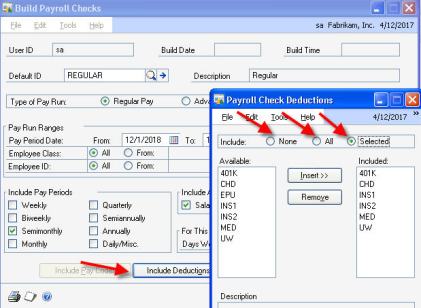
Using Microsoft Dynamics GP, if you do Bi-weekly payrolls, you pay employees 26 times a year. If you have monthly deductions, like health insurance, you have a monthly amount for each employee to deduct.
Posted 2012
Using Microsoft Dynamics GP, if you do Bi-weekly payrolls, you pay employees 26 times a year. If you have monthly deductions, like health insurance, you have a monthly amount for each employee to deduct.
We all know Reconciling our cash to the Bank is important, and if you are using the Microsoft Dynamics GP Bank Reconciliation Module… YOU’RE A HERO!
Originally Posted March 2012

We all know Reconciling our cash to the Bank is important, and if you are using the Microsoft Dynamics GP Bank Reconciliation Module… YOU’RE A HERO! But, it is equally important to make sure the sub-module of Bank Reconciliation (BR) balance the GL accounts for the cash in the General Ledger (GL.) Remember we can prove the BR balance, and the BR proof is the GL proof; so this is VERY IMPORTANT!
Continue reading “Is your Dynamics GP GL Cash Balance Right?”
 Belinda Allen, Microsoft MVP Business Solutions