Void a Partially Applied Payables Credit Memo in Microsoft Dynamics GP

Ever try to void a Payables Credit Memo, Return or Payment in Microsoft Dynamics GP only to receive the error message that is it either on hold or partially applied?

Ever try to void a Payables Credit Memo, Return or Payment in Microsoft Dynamics GP only to receive the error message that is it either on hold or partially applied?

Originally Posted 5/10/12

Ever try to void a Payables Credit Memo, Return or Payment in Microsoft Dynamics GP only to receive the error message that is it either on hold or partially applied?

Removing a hold is easy, but what do you do if it is partially applied.

In this video I will walk you through the easiest way I found to handle just this scenario!

Continue reading “Void a Partially Applied Payables Credit Memo in Microsoft Dynamics GP”

Microsoft Dynamics GP – Manage Purchase Orders with Excel

If you use Microsoft Dynamics GP and have ever wanted to easier way to monitor open purchase orders and line items that have been received and not invoiced, you’re in luck.

If you use Microsoft Dynamics GP and have ever wanted to easier way to monitor open purchase orders and line items that have been received and not invoiced, you’re in luck.

Originally Posted 5/7/2012

If you use Microsoft Dynamics GP and have ever wanted to easier way to monitor open purchase orders and line items that have been received and not invoiced, you’re in luck.

I will show you how to use Excel Refreshable Reports to monitor both Open and Historical Invoices.  It’s easier than you might think!

Continue reading “Microsoft Dynamics GP – Manage Purchase Orders with Excel”

Microsoft Dynamics GP – Miscellaneous Check

Need to print a single check for a one time purchase using Microsoft Dynamics GP?

In this video, I’ll show you how to do just that!  I’ll use the Miscellaneous Check Entry Window to avoid having to setup a vendor to get 1 check.

Originally Posted 5/4/2012

Need to print a single check for a one time purchase using Microsoft Dynamics GP?

In this video, I’ll show you how to do just that!  I’ll use the Miscellaneous Check Entry Window to avoid having to setup a vendor to get 1 check.

Continue reading “Microsoft Dynamics GP – Miscellaneous Check”

Microsoft Dynamics GP Inventory cost variance on PO’s (with video)

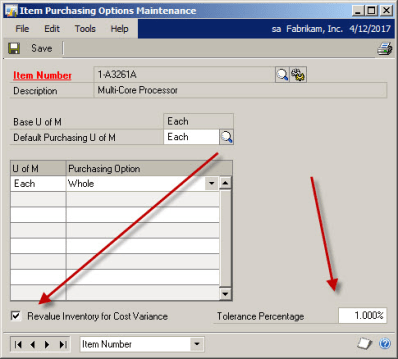
What happens if you receive a shipment in Microsoft Dynamics GP Purchase Order Processing and the invoice comes in for a different dollar amount? 

What happens if you receive a shipment in Microsoft Dynamics GP Purchase Order Processing and the invoice comes in for a different dollar amount? 

Originally Posted 5/2/12

Q:  What happens if you receive a shipment in Microsoft Dynamics GP Purchase Order Processing and the invoice comes in for a different dollar amount?
A:   That depends on how you set up the item in inventory.

Continue reading “Microsoft Dynamics GP Inventory cost variance on PO’s (with video)”

Microsoft Dynamics GP SmartList Comparison Fields

This is a cool way to use SmartList! Comparing 2 similar Microsoft Dynamics GP fields makes creating a list of Customers over their credit limit a snap! See how I do it.

Originally Posted 6/21/2011

This is a cool way to use SmartList! Comparing 2 similar Microsoft Dynamics GP  fields makes creating a list of Customers over their credit limit a snap! See how I do it.                         

Continue reading “Microsoft Dynamics GP SmartList Comparison Fields”

What’s the deal with the Apply Date in Microsoft Dynamics GP Payables?

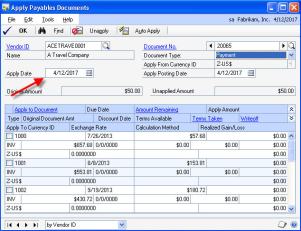
The Apply Date that shows in the apply window for Microsoft Dynamics GP Payables has an important role. The apply date that is used when the invoice becomes fully applied will become the “Date Invoice Paid Off.”

The Apply Date that shows in the apply window for Microsoft Dynamics GP Payables has an important role. The apply date that is used when the invoice becomes fully applied will become the "Date Invoice Paid Off."
Posted April 2012
The Apply Date that shows in the apply window for Microsoft Dynamics GP Payables has an important role. The apply date that is used when the invoice becomes fully applied will become the “Date Invoice Paid Off.”
This field of “Date Invoice Paid Off” will determine when to display an invoice on a Historical Aged Trial Balance AND when to include the invoice’s 1099 amounts on the 1099.

User Defined Fields in Microsoft Dynamics GP Smartlist?

I wanted to share with you another use for Microsoft Dynamics GP User Defined fields.

I wanted to share with you another use for Microsoft Dynamics GP User Defined fields.

Continue reading “User Defined Fields in Microsoft Dynamics GP Smartlist?”

Add Microsoft Dynamics GP SmartList to your toolbar

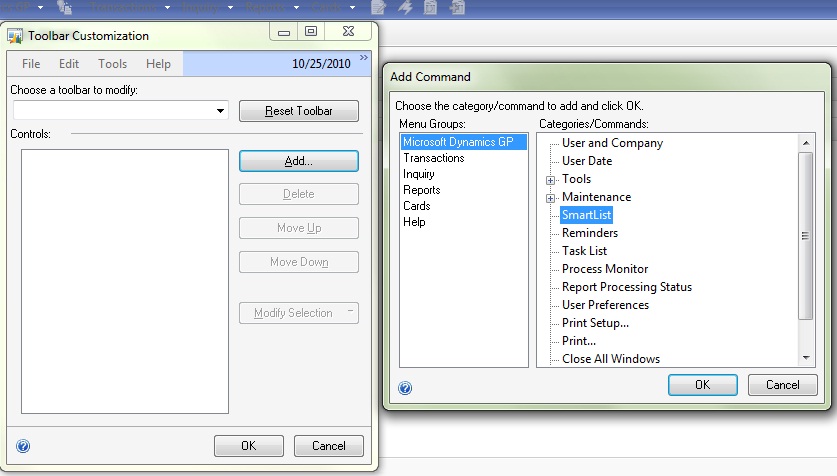
Add Microsoft Dynamics GP SmartList to your toolbar, it’s easy!

Add Microsoft Dynamics GP SmartList to your toolbar, it’s easy!

2012-04-02_Toolbar

Right mouse click on your GP toolbar, choose the Add button on the Right. Then click through the menu bar as you would to open SmartList.
Once SmartList is highlighted, click OK!


Why do we have to age Microsoft Dynamics GP Receivables?

I frequently get asked “Why is there a separate step to age Microsoft Dynamics GP Accounts Receivable?” 

Posted 4/1/2012
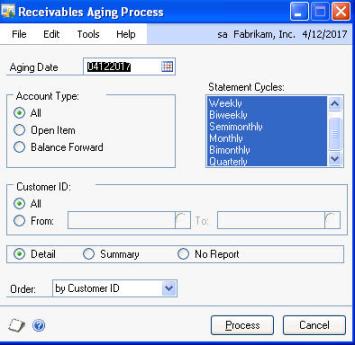
I frequently get asked "Why is there a separate step to age Microsoft Dynamics GP Accounts Receivable?" 

I frequently get asked “Why is there a separate step to age Microsoft Dynamics GP Accounts Receivable?”

Believe it or not, it’s actually a benefit to you.

I have a client who charges their customer a finance charge for all invoices 30 days or older; however experience tells them that many times they charge finance charges, only to receive the payment within a day or two causing them the extra work of writing off the finance charge.

We worked together and created a very smart plan. We change the aging periods from 1-30 to 1-45, then age and charge finance charges for invoices over 45 days old. We then change the aging period back to 1-30 and age again. This method, only ended up charging finance charges for invoices over 45 (even though their customer is expecting over 30)days old.

There are many reasons you may want or need control over aging, and with GP you have it!

Save Time and Effort with Microsoft Dynamics GP Advanced Lookups

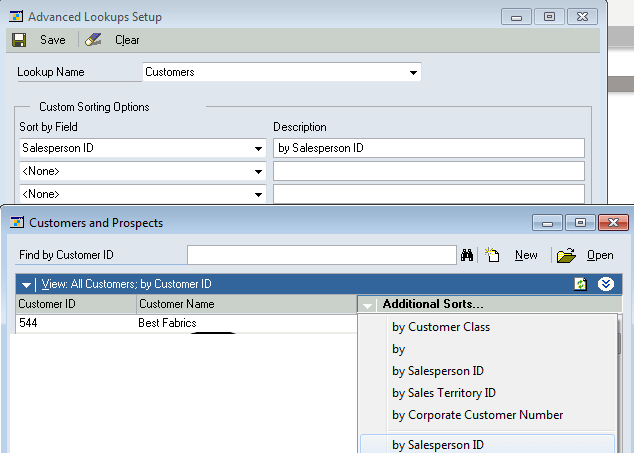
I have the need to look up invoices in Microsoft Dynamics GP Sales Order Processing by the Ship to Address. Until I setup Advanced Lookups to help me, I didn’t realize how much time and effort I used finding the right invoice. I then expanded my use of Advanced Lookups to include GL Accounts. Wow, taking advantage of a small featured yielded me great benefits! 

Originally Posted 3/29/12

I have the need to look up invoices in Microsoft Dynamics GP Sales Order Processing by the Ship to Address. Until I setup Advanced Lookups to help me, I didn’t realize how much time and effort I used finding the right invoice. I then expanded my use of Advanced Lookups to include GL Accounts. Wow, taking advantage of a small featured yielded me great benefits!

Continue reading “Save Time and Effort with Microsoft Dynamics GP Advanced Lookups”