
Originally Posted 5/23/11
This video shows how to work using the Navigation Pane/Lists rather than using the traditional menu driven method using Microsoft Dynamics GP. It could be a real game changer for you!

Belinda Allen, Microsoft MVP Business Solutions
Things I've learned from years of working with Microsoft Dynamics GP.
This video shows how to work using the Navigation Pane/Lists rather than using the traditional menu driven method using Microsoft Dynamics GP. It could be a real game changer for you!
Originally Posted 5/23/11
This video shows how to work using the Navigation Pane/Lists rather than using the traditional menu driven method using Microsoft Dynamics GP. It could be a real game changer for you!
Post from Mahmood M. AlSaadi: The new MS Connect website has been released recently providing spaces for ideas, blogs, trials, help and roadmap for Dynamics 365 and Dynamics GP. Yes, Dynamics GP is part of the new portal and it is not going away.

The new MS Connect website has been released recently providing spaces for ideas, blogs, trials, help and roadmap for Dynamics 365 and Dynamics GP. Yes, Dynamics GP is part of the new portal and it is not going away.
As published by the Microsoft Dynamics GP Support and Services blog, it was addressed that
“Have no fear, the end is nowhere near for Microsoft Dynamics GP. We are back in business, you have an IDEA? We want to hear it. The MS Connect site was decommissioned before the new site was ready so I know you are eager to start entering all your feedback for Microsoft Dynamics GP. We have a new release targeting for the end of the year so now is the time you should enter those fabulous new product ideas you want to see in the software you use and love every day!!”
See the full post using the link: Full Post
Mark was sharing his thoughts and opinions on the future of the Microsoft Dynamics family. As much as I respect Mark, I disagree with most of his blog post, even going so far as to state that it has some incorrect facts about Microsoft Dynamics GP that I would like to clear up.

Last Friday Morning, as I was returning from GPUG Amplify in Chicago, I read a blog post from my friend and NAV community leader, Mark Brummel, entitled All roads lead to Sweden with Microsoft Dynamics 365 Business Central.
Mark was sharing his thoughts and opinions on the future of the Microsoft Dynamics family. As much as I respect Mark, I disagree with most of his blog post, even going so far as to state that it has some incorrect facts about Microsoft Dynamics GP that I would like to clear up.
In this video, I show how to create additional lookup options AND I show how Rockton SmartFill works with Microsoft Dynamics GP. Check it out!

I saw some great discussion on the GPUG (GP User Group) Forum about looking up Microsoft Dynamics GP GL Account numbers by Segment Descriptions.
In this video, I show how to create additional lookup options AND I show how Rockton SmartFill works with Microsoft Dynamics GP. Check it out!
Hope this helps!
Continue reading “Looking up Microsoft Dynamics GP Accounts by Segment Descriptions (Video)”
Thanks Mark, I am going to be testing and playing with the new OData this week, so this was timely! 🙂
Introducing Microsoft Dynamics GP OData Version 4 – Microsoft Dynamics GP Community The original OData release had a few issues so it’s nice to see ongoing updates with this feature. The post Introducing Microsoft Dynamics GP OData Version 4 – Microsoft Dynamics GP Community appeared first on DynamicAccounting.net.
Today’s posting is specific to Microsoft Office only, particularly Excel and Word.
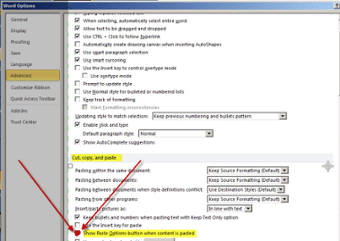
When meeting with a customer yesterday, he mentioned having problems copying Excel spreadsheets into Word. When she chose to copy, the formatting was lost. She liked using the “Track Changes” feature for reviewing documents and information in Microsoft Word.
Originally Posted 8/23/2012
Today’s posting is specific to Microsoft Office only, particularly Excel and Word.
When meeting with a customer yesterday, he mentioned having problems copying Excel spreadsheets into Word. When she chose to copy, the formatting was lost. She liked using the “Track Changes” feature for reviewing documents and information in Microsoft Word.
Continue reading “Pasting an Excel sheet into Word not just Microsoft Dynamics GP data”
Have you ever needed to compare data in 2 Microsoft Excel Spreadsheets?
In this video, I show how I compare the addresses on the Microsoft Dynamics GP Vendor card with the addresses in the Vendor Address card. One of my followers asked me about this comparison due to concerns that the data imported in each table might not match. I’ll use the Excel Add-on, Inquire, to compare data from each of these tables.
The Spreadsheet Inquire window can compare any Excel files, and do so much more!

Have you ever needed to compare data in 2 Microsoft Excel Spreadsheets?
In this video, I show how I compare the addresses on the Microsoft Dynamics GP Vendor card with the addresses in the Vendor Address card. One of my followers asked me about this comparison due to concerns that the data imported in each table might not match. I’ll use the Excel Add-on, Inquire, to compare data from each of these tables.
The Spreadsheet Inquire window can compare any Excel files, and do so much more!
Continue reading “Compare 2 Microsoft Excel Files using Inquire (Video)”
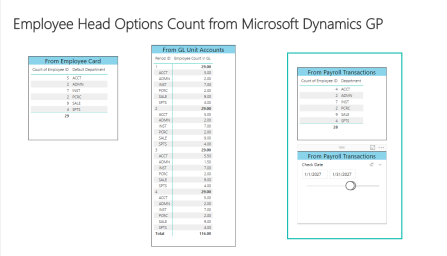
This 9-ish minute video shows how I performed the data modeling and visual creation of the Microsoft Dynamics GP Employee Head count using the Historical Payroll Checks in Microsoft Power BI.
Part 4 of a 4-Part Series
This 9-ish minute video shows how I performed the data modeling and visual creation of the Microsoft Dynamics GP Employee Head count using the Historical Payroll Checks in Microsoft Power BI.
Continue reading “Obtaining Microsoft Dynamics GP Employee Head Count (Part 4) in Power BI (Video)”
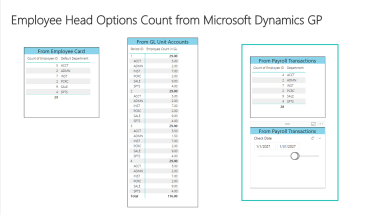
This 15-ish minute video shows how I performed the data modeling and visual creation of the Microsoft Dynamics GP Employee Head count using the General Ledger Unit Accounts in Microsoft Power BI.
Part 3 of a 4-Part Series
This 15-ish minute video shows how I performed the data modeling and visual creation of the Microsoft Dynamics GP Employee Head count using the General Ledger Unit Accounts in Microsoft Power BI.
Continue reading “Obtaining Microsoft Dynamics GP Employee Head Count (Part 3) in Power BI (Video)”
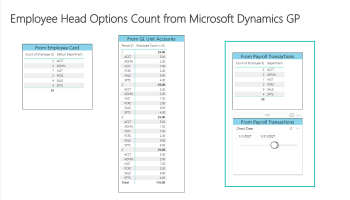
This 8-ish minute video shows how I performed the data modeling and visual creation of the Microsoft Dynamics GP Employee Head count using the Employee Maintenance data in Microsoft Power BI.
Part 2 of a 4-Part Series
This 8-ish minute video shows how I performed the data modeling and visual creation of the Microsoft Dynamics GP Employee Head count using the Employee Maintenance data in Microsoft Power BI.
Continue reading “Obtaining Microsoft Dynamics GP Employee Head Count (Part 2) in Power BI (Video)”
 Belinda Allen, Microsoft MVP Business Solutions